

Digital Writing Apps for Apple
With the right apps, you can unleash the full potential of the LAMY safari note+ and open up the variety of features in digital writing – discover apps for note-taking, organising and calculating, for designing, drawing and sketching, for playing, painting and composing.
Our Partner Apps
Discover the apps of our partners here. These are apps that are precisely tailored to the capabilities of the LAMY safari note+. With these apps, you can experience the full range of features: individually configurable function buttons, pressure sensitivity and much more.
Design your way with Linearity Curve
Design anything you can imagine with Linearity Curve’s dynamic graphic design tools. Create complex illustrations with smooth vector brush strokes, paths, and Bézier curves, or transform photos using AI Backgrounds, Auto Trace, and Background Removal.
Linearity Curve works seamlessly with the LAMY safari note+, combining the precision of analogue drawing with the versatility of digital technology.
Features: all basic features, plus: configurable function buttons, pressure sensitivity

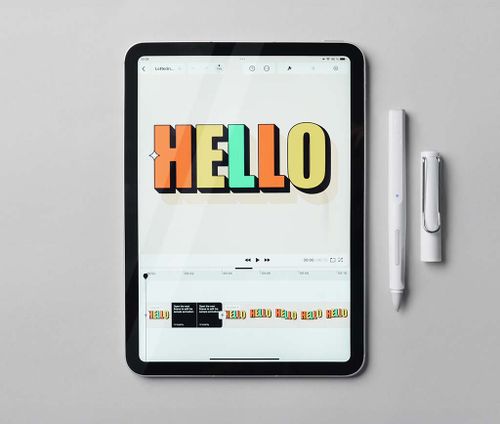
Put your ideas into motion with Linearity Move
Animation doesn’t need to be complicated. With Linearity Move, anyone can create engaging motion graphics in a few simple steps.
Use the LAMY safari note+ to apply powerful animation effects, bring static graphics to life instantly with Auto Animate, and make design tweaks on the fly by switching between Animate and Design modes. This seamless integration empowers you to create dynamic, professional animations effortlessly.
Features: all basic features, plus: configurable function buttons
Calculator Max
Calculator Max makes both simple and complex calculations easy. It offers calculators in one carefully designed, uncluttered and easy-to-use package.
Features: all basic features, plus: configurable function buttons

Charcoal
Charcoal allows you to visualise ideas. It’s simple and focuses on what matters.
Features: all basic features, plus: configurable function buttons

Stift: Calender for iPad
Forget the keyboard, here you can fill out your schedule simply with a pen!
Features: all basic features, plus: configurable function buttons

Bulletpoint
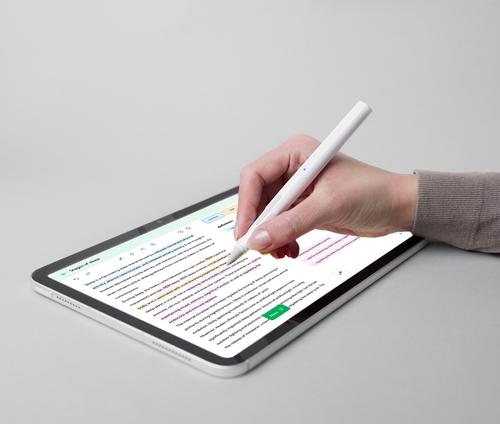
Bulletpoint instantly turns your text highlights into bullet points and uses AI to generate personalised flashcards. Create summaries at reading speed for better comprehension and more efficient learning.
Features: all basic features, plus: configurable function buttons
Voovo
Utilise the power of spaced repetition and active recall with digital flashcards without the struggle of creating digital flashcards.
Features: all basic features, plus: configurable function buttons

Our app for the LAMY safari note+
The LAMY safari note+ is the first pen that is constantly being developed and improved: with the "LAMY safari note+" app, you can always download the latest version of its firmware, making your LAMY safari note+ the best LAMY safari note+.

Other apps that we recommend
The LAMY safari note+ has a very big advantage: thanks to the use of Apple's "Pencil Protocol", no installation or configuration is required for most features. Simply switch it on and get started straight away; it works in conjunction with any app (all functions except: pressure sensitivity and the assignment of the function buttons, these are only possible in Partner Apps). We would like to recommend the following apps:

GoodNotes
Replace your paper notebooks with Goodnotes and immerse yourself in the world of digital notes.
Features: all basic features

Milanote
Milanote is an easy-to-use tool for organising your ideas and projects in visual boards.
Features: all basic features

Nebo
Create beautiful notes and professional documents by hand, sketch ideas in an infinite workspace. Powered by the world's best AI handwriting recognition.
Features: all basic features
Sketchbook®
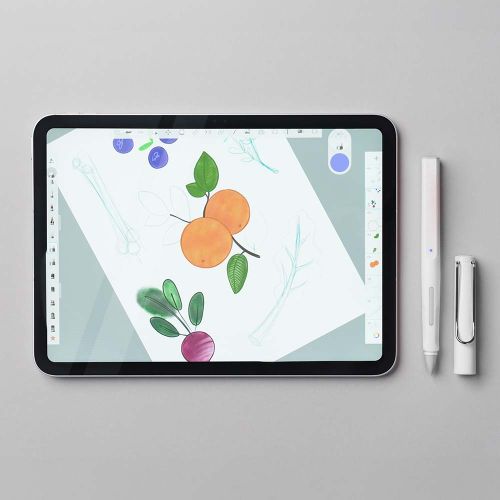
You never know when a great idea will pop up or where it will lead.
From quick sketches to finished works of art, Sketchbook® accompanies you on your creative journey.
Features: all basic features


Compatibility check
The LAMY safari note+ is compatible with iPads released since 2018. A detailed list of all exact models can be found in this table:
6. Gen., 9.7" ("iPad 9.7") | 7. Gen., 10.2" ("iPad 2019") | 8. Gen., 10.2" ("iPad 2020") | 9. Gen., 10.2" ("iPad 2021") | 10. Gen., 10.9" ("iPad 10") | 11. Gen., 11" ("iPad A16")
3. Gen., 11" & 12.9" | 4. Gen., 11" & 12.9" | 5. Gen., 11" & 12.9" ("M1 iPad Pro") | 6. Gen., 11" & 12.9" ("iPad Pro M2")
3. Gen., 10.5" | 4. Gen., 10.9" | 5. Gen., 10.9" ("iPad Air M1") | 7. Gen., 11" & 13" ("iPad Air M3")
5. Gen., 7.9" ("iPad mini 5") | 6. Gen., 8.3" ("iPad mini 6")
FAQs on the apps
All functions of the LAMY safari note+, except for the pressure sensitivity and the assignment of the function buttons, work immediately and without any installation or configuration on any compatible iPad. It is important that neither an Apple Pencil nor a stylus from another manufacturer is paired with the iPad. Please unpair them first.
The LAMY safari note+ is paired in the settings of the respective app. The exact location can vary from app to app.
Pairing is only possible in apps from our partners. A list of these apps can be found here.
The LAMY safari note+ is designed to function properly only when used directly on the iPad display. However, tests have shown that it often works even with many protective films.
The most common reason for this is that either an Apple Pencil or a third-party stylus is paired with the iPad. Please unpair and try again.
For developers: Get your app ready for the LAMY safari note+
The LAMY iPadOS SDK is a free-of-charge framework for iPadOS that provides you with the necessary tools to integrate a comprehensive sketching experience into your apps when used with Lamy’s Bluetooth pen line. It includes support for the following functions: pressure sensitivity, function buttons and battery level. We also provide templates and components Figma for the UI of the settings.

Digital Writing Software: How to use the right apps to unlock the full potential of your LAMY iPad pen
Welcome to the world of digital writing at LAMY. Here, the timeless aesthetics of a classic LAMY writing instrument meet the limitless possibilities of modern technology. Whether in a lecture theatre, a business meeting or a studio: the right digital writing software is at the heart of your effective workflow on the iPad.
Writing is more than just recording information; it is a cognitive process. Time and again, it has been shown that we internalise content better when we write it down by hand.
Note-taking app. Design app. Organisation app: experience a world of possibilities on your iPad
Partner apps as digital writing software from Apple offer an impressive variety of options for digital writing.
But which app really suits your LAMY safari note+ and your individual requirements and needs?
We have categorised the most important applications for you.
Some of these writing apps (iOS) are specifically optimised to harness the full potential of the LAMY safari note+, including the customisable function keys and the Pressure sensitivity of the tip.
In addition to these partner apps, we also recommend well-known classics for digital writing, which are ready to use straight away via the ‘Apple Pencil Protocol’ (albeit without the special key features):
Note-taking apps
Goodnotes: As Apple’s standard note-taking app, it stands out with its classic notebook structure. Replace your paper notebooks and step into the world of digital notes!
Nebo: Renowned for the world’s best handwriting recognition. Make use of the infinite workspace and create notes and documents by hand with this app.
Milanote: A visual tool for organising projects and creative ideas on your iPad in the form of a visual board.
Creativity & Design
Linearity Curve: This app is a dynamic tool for graphic design and illustration. With the LAMY safari note+, you can utilise full precision when drawing to create fine brushstrokes and complex illustrations. You can use it, for example, to edit photos with AI support or design logos.
Linearity Move: Linearity Move makes it easy to animate graphics. The LAMY safari note+ pen helps you animate static designs. Here too, the pen’s function buttons support a fast workflow between ‘Animate’ and ‘Design’ modes.
Charcoal: For anyone who wants to focus on the essentials. Charcoal is an app for sketching and visualising ideas. It is kept simple and utilises the pen’s configurable function keys.
Sketchbook: Ideal for creatives: from quick idea sketches to finished works of art.
Productivity & Organisation
Handwritten pen calendar for iPad: This app puts an end to typing in appointments. You can organise your entire schedule by hand, just as if you were using a traditional paper calendar. The integration of the LAMY safari note+ makes planning even more efficient thanks to the customisable buttons.
Calculator Max: A modern calculator that solves both simple and complex calculations with an attractive design. Partner integration allows you to perform calculations smoothly and control shortcuts directly via the pen.
Learning & Education
Bulletpoint: An innovative tool for school and university students. Highlights in texts are converted directly into bullet points. Using AI, the app creates personalised flashcards and summaries from your notes, making learning significantly more efficient.
Voovo: This app is based on the active recall method. It allows you to create digital flashcards in a flash, without wasting unnecessary time on formatting. The LAMY safari note+ supports you in this by enabling quick navigation via the function keys.
No matter which app you choose for writing on your iPad with our LAMY pen: with the right digital writing software, you can take your possibilities to a whole new level.
Analogue meets digital
Digital writing is not an alternative to analogue writing, but its logical evolution. With the right digital writing software in a suitable app and a LAMY safari note+ at your side, the boundaries between the analogue and digital worlds become blurred.
Discover our selection of partner apps now and find the app that will revolutionise your daily life, your workflow or your creativity.
FAQ
Many of the professional apps mentioned by LAMY offer free basic versions or trial periods. For example, users can create up to three notebooks for free with Goodnotes.
Yes. Thanks to the Apple Pencil Protocol, the pen works with almost any iPad app (e.g. Goodnotes, Procreate or Apple Notes) for all basic functions such as writing and drawing. Only the button assignments and pressure levels are usually not active in these apps.
Yes, the LAMY safari note+ app. This is used to keep the firmware up to date, ensuring your writing instrument remains compatible with the latest app updates.